How large can you print a photograph from a given camera or file? The honest answer is: larger than most charts will tell you, smaller than camera marketing implies, and the right answer depends on viewing distance more than on megapixels alone. This page gives you a working chart, a real method for figuring out your specific situation, and the rules of thumb that hold up.
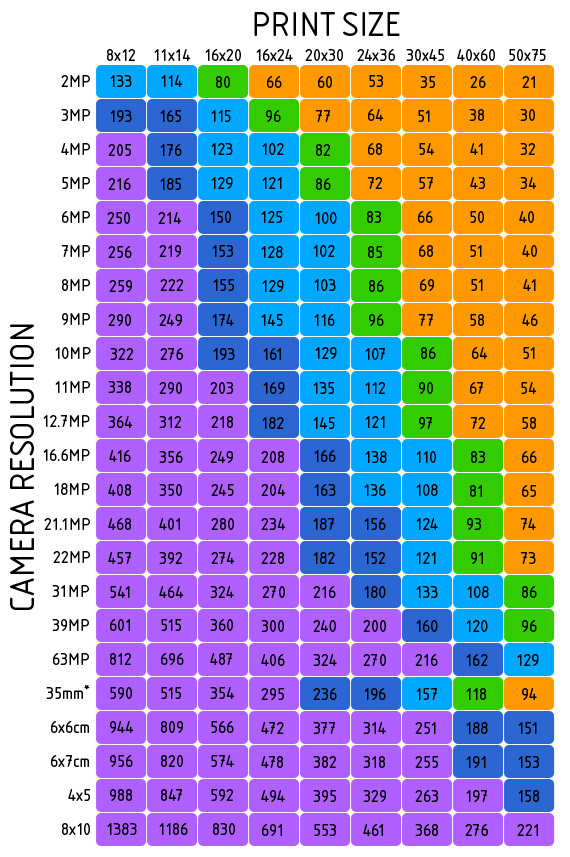
The Rule of Thumb
Divide your image’s pixel dimensions by the target PPI (pixels per inch) to get the maximum print size. A 24-megapixel image is roughly 6000 by 4000 pixels. At 300 PPI (print-quality) that is 20 by 13 inches. At 200 PPI (still very good) that is 30 by 20 inches. At 150 PPI (acceptable for prints viewed from a few feet) that is 40 by 27 inches.
Want the answer for your own file? Enter its pixel dimensions in the print size calculator and it tells you how large the file prints at each quality level.
Print Quality Tiers by PPI
| Quality | What it gives you | PPI range |
|---|---|---|
| Superb | The highest visible quality. Indistinguishable from a contact print at any normal viewing distance. | 300+ PPI |
| Excellent | Effectively identical to Superb for prints viewed at arm’s length. | 200 to 299 PPI |
| Very good | High quality. Suitable for nearly all photo prints. | 150 to 199 PPI |
| Acceptable | Fine for prints viewed from two or more feet away. Slight softness at close inspection. | 100 to 149 PPI |
| Wall-art only | Sharpness reduced, but still works for large wall prints viewed from across a room. | Below 100 PPI |
Viewing Distance Matters More Than Megapixels
The eye cannot resolve detail beyond a certain angular size. A print viewed from one foot away reveals every flaw in the file. The same print viewed from six feet away can be a quarter the resolution and look identical. Wall-art and gallery prints are almost always seen from feet away, not inches; using strict 300 PPI rules to size them throws away most of the file you have.
A practical rule: minimum acceptable PPI roughly equals 300 divided by the typical viewing distance in feet. A print viewed from 3 feet away can be 100 PPI and look sharp. A print viewed from 6 feet can be 50 PPI. Billboards seen from across the street are routinely printed at under 20 PPI.
Planning where it will hang? How to hang photos covers height, spacing and planning a wall.
Common Mistakes
- Using 300 PPI as a hard rule. 300 PPI is correct for prints viewed at reading distance. For wall art it is overkill and forces you to upscale or shoot a higher-megapixel camera you do not need.
- Confusing DPI and PPI. DPI is a printer specification. PPI is the file’s pixel density. They are different concepts that get used interchangeably in software dialogs and online articles. DPI vs PPI sorts out which number matters where.
- Trusting only the megapixel number. A clean, sharp 12 MP file enlarges better than a noisy, soft 24 MP file. Sensor size, lens sharpness, and post-processing all change the effective resolution.
- Upscaling and assuming detail is added. Photoshop’s Preserve Details 2.0, Topaz Gigapixel, and similar tools can interpolate cleanly but they cannot invent fine detail that was not captured. They make a soft enlargement look acceptable; they do not turn 12 MP into 60 MP.
- Ignoring the print’s actual look. The chart is a starting point. The only test that matters is: print a small section at full target size and look at it under the lighting you will display it in. Adjust accordingly.
Try This
Pick a recent photograph and crop a 4-by-6 inch section that contains your subject’s most important detail (an eye in a portrait, a leaf in a landscape, a building edge in architecture). Print just that crop at the size it would have if you printed the whole image at your target wall size. Look at it from your intended viewing distance. If the detail still looks sharp, the larger print will too. If it does not, your target size is too big or your file needs more sharpening, less noise reduction, or a re-shoot.
Printing it yourself? How to print photos at home covers the printer, the paper and the settings that matter.
FAQ
How big can I print from a 12 megapixel camera? 12 MP is roughly 4256 by 2832 pixels. At 300 PPI that is 14 by 9 inches; at 200 PPI it is 21 by 14 inches; at 150 PPI it is 28 by 19 inches. Plenty for most home prints and small wall art.
How big from a 45 megapixel camera? Roughly 8256 by 5504 pixels. At 300 PPI: 27 by 18 inches. At 200 PPI: 41 by 27 inches. At 150 PPI: 55 by 36 inches. Enough for serious gallery work.
Will more megapixels make my prints sharper? Only up to a point. Print sharpness is mostly a function of focus accuracy, lens quality, and ISO. A 20 MP file from a sharp lens at low ISO out-prints a 60 MP file from a soft lens at high ISO at the same size.
Does shooting RAW vs. JPEG affect print size? Indirectly. RAW gives you more headroom for noise reduction, sharpening, and tonal recovery. A clean RAW print looks better large than a baked-JPEG of the same dimensions.
What about printing for a billboard? Billboards print at 10 to 25 PPI because they are viewed from 50+ feet. Even a phone camera file is enough. Resolution becomes a non-issue at that scale.
Related Reading
- Print size calculator: do the math for your specific file.
- Preparing photos for print: sharpening, color profiles, and file prep.
- RAW vs. JPEG: which gives you more print latitude.
- Megapixel reference table: deeper data on sensor resolutions.